Beyond Data: Operational AI Powered by Skills and Insights

by Rick Szcodronski, Chief Product Officer, Willow
Looking across airports, hospitals and university campuses, facility data comprising of assets, work orders, spaces, and telemetry is increasingly being surfaced via Model Context Protocol (MCP) tools, signaling that AI-native access to enterprise data is quickly becoming table stakes. While making enterprise data consumable by AI assistants provides a core foundational capability, the greatest value comes from an additional layer of domain knowledge, analytics, workflows, and insights that transform data into meaningful context. This enables AI experiences that move beyond data retrieval to deliver recommendations, anomaly detection, prioritization, and actionable decision support.
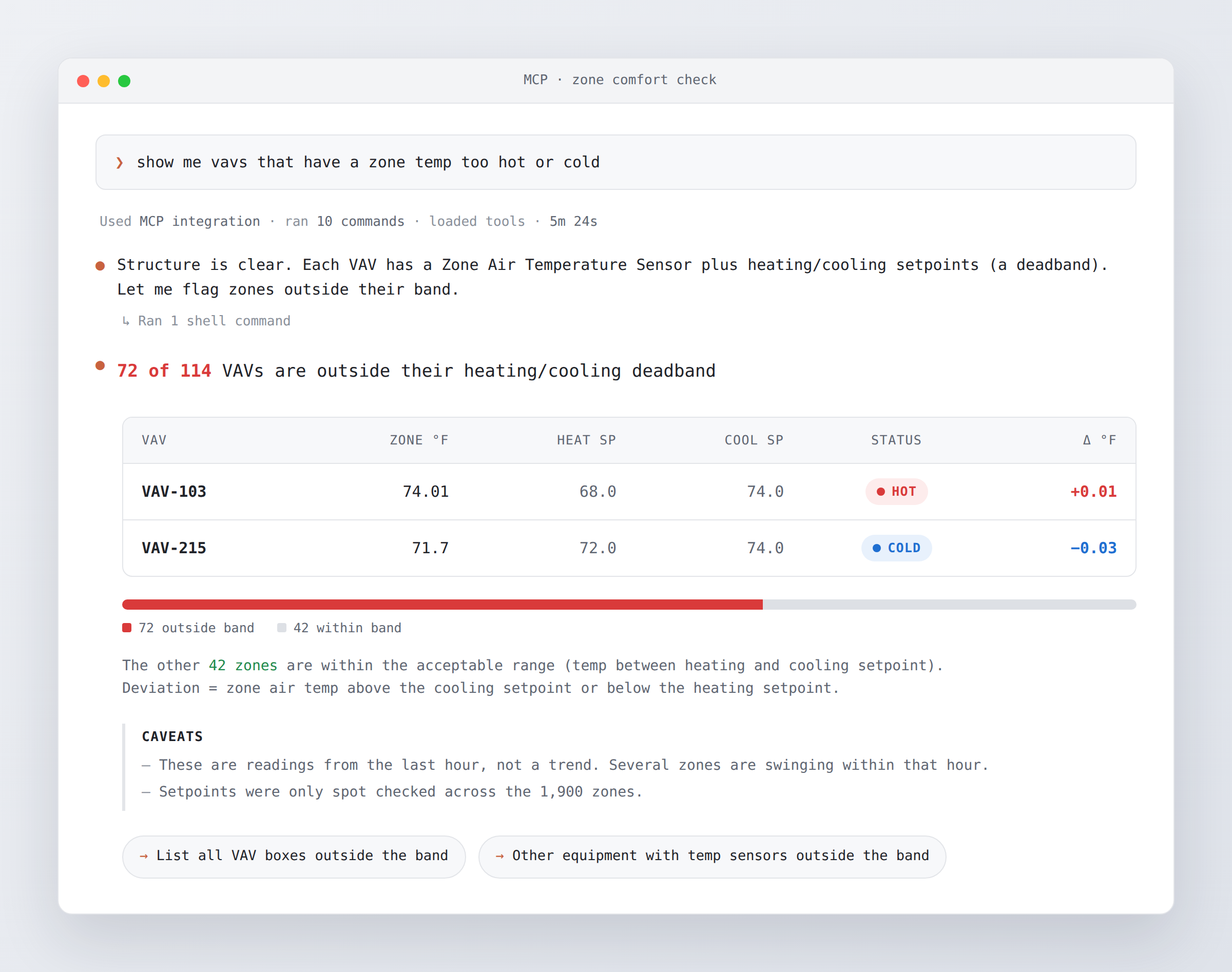
If you’re considering interpreting data from a data layer directly with an LLM, as shown above, consider these questions:
- Do you want a warning of HOT for spaces 0.01 above the cooling setpoint for a 5-minute stretch?
- How should you handle temporal variations such as the space is fine at this moment but has been terrible over the past 24 hours?
- How well does your analysis and prompt need to understand additional equipment and system context such as whether the equipment is running or the upstream system is running? Does it need to reason over the difference between ‘enabled’ versus ‘running’ versus ‘proven running’ via feedback? How well does the LLM understand the differences not just between 2 setpoints of heating and cooling but the typical 6 setpoints you may find across occupied/unoccupied modes and heating/cooling modes? Does it understand the VAV has a programmed deadband (different than the LLM-assumed deadband which is from a target temp), which differs based on the modes, i.e. allowed to drift more at night during unoccupied?
- Did the response include a follow-up to recommend that you should be asking about correlations, root cause, and be shown the fix rather than just returning back the symptoms across a floor like your BMS floor graphic can show you?
The value of an LLM is not simply interpreting raw telemetry or comparing values against setpoints. Real building operations require contextual awareness of thresholds, operating modes, temporal behavior, equipment state, control logic, and proven remediation workflows. To deliver trustworthy outcomes, AI must be combined with domain-specific skills and analytics that answer questions such as whether a condition is truly actionable, how performance has evolved over time, what operating modes and equipment states should be considered, whether system behavior is within expected control sequences, and most importantly, what the likely root cause and recommended corrective action should be. The goal is not to replace deterministic building intelligence with LLMs, but to combine them so that AI can reason over curated operational insights instead of raw data alone.
Willow’s Approach
Willow offers AI experiences both in the form of a companion Copilot and MCP servers that can be accessed from LLM experiences in Microsoft Teams, M365 Copilot, and any enterprise-sanctioned LLM including Claude, Chat GPT and more. Both approaches leverage a layer of skills and insights on top of the data layer. Combining deterministic and non-deterministic techniques optimizes token usage and improves response repeatability. Let’s walk through each of the questions we posed.
1. Avoid triggering alerts on spaces 0.01 degrees above the heating setpoint
A comfort-related alert should not classify a space as ‘hot’ merely because the measured temperature is 0.01° above the heating setpoint. That would be a technically true threshold crossing but a poor operational signal. A robust solution should:
- Use the active setpoint for the current mode
The comparison should use the applicable occupied, standby, or unoccupied heating/cooling setpoint and not a generic setpoint. HVAC controllers determine the active setpoint from occupancy mode, heating/cooling mode, deadband, and configured limits. The actual points will carry various names, which is why having a robust ontology that Willow Copilot understands is important. - Apply a meaningful tolerance or comfort band
A small deviation such as 0.01° should remain inside a tolerance band or deadband. The condition should only become actionable after the temperature exceeds a meaningful margin, for example:
temperature ≥ cooling setpoint + tolerance → potentially hot
temperature ≤ heating setpoint − tolerance → potentially cold
The exact tolerance must come from the configured rule or a customer-specified settings; it should not be assumed from the setpoint itself. - Require persistence or repeated evidence
The insight should evaluate whether the deviation persists for a defined duration or recurs repeatedly, rather than firing on one sample. This is especially important for comfort because conditions and occupant perception vary over time. - Weigh severity and duration
A space that is 0.01° beyond a threshold for one reading should not receive the same treatment as a space that is 3° beyond the comfort band for several hours. A daily comfort score is better suited to capturing that distinction than an instantaneous ‘hot’ label. - Use the correct direction for hot vs cold
A heating setpoint is normally a lower bound: being slightly above it is not automatically a hot-space condition. ‘Hot’ should generally be evaluated against the applicable cooling or upper comfort limit, while ‘Cold’ should be evaluated against the applicable heating or lower comfort limit.
2. Handle temporal variations to consider conditions now and in the past 24 hours
An appropriate approach is to use a daily comfort score calculated from the zone’s temperature history over the preceding 24 hours. It can evaluate:
- The percentage of time the zone was within its applicable comfort range
- The duration of excursions outside that range
- The magnitude of hot or cold deviation
- Separate minimum, average, and maximum zone temperature
- The applicable occupied/unoccupied and heating/cooling setpoints
As a result, it becomes possible to distinguish conditions like: ‘Comfortable now, but poor over the last 24 hours’ and ‘Uncomfortable now, but generally acceptable over the last 24 hours’. The available thermal-comfort dataset in Willow is designed for this type of temporal view: it provides a daily comfort score and daily zone-temperature minimum, average, and maximum values. The retrieved building requirements also recognize that thermal-comfort factors vary with time and that prior exposure can affect comfort perception.
Here is an example insight: Zone Air Temperature Deviates from Weekly ASHRAE Comfort Requirements. A 24-hour calculation is used:
Comfort score = time within the applicable comfort band ÷ total evaluated time
A zone could currently be at an acceptable temperature while still receiving a poor daily score because it spent much of the previous day outside its comfort band. The score preserves duration and severity, so a brief 1 °F excursion is not treated the same as many hours at a substantially uncomfortable temperature.
3. Understand equipment mode and system context
Correlating occupancy and HVAC signals generates richer insights than raw telemetry signals. Willow also considers the equipment mode of operation. An example Skill is Zone Temperature Above Cooling Setpoint – Zone Hot. It runs on every HVAC Zone twin and flags a ‘zone hot’ fault when an occupied zone, served by running equipment, is more than a deadband warmer than both its active setpoint and its cooling setpoint.
Let’s explore how it takes into account upstream conditions.
- Is the serving equipment enabled?
This check looks upstream first at the AHU feeding the terminal, then the AHU group, then the air system. Only after that does it fall back to the terminal’s own fan points, the supply air system, and finally a ‘terminal is clearly getting air’ check, e.g. airflow above 30 cfm and damper more than 5% open. Only the checks that have data count. The AHU is on if at least one proof and one command are on, with no more than one proof missing. Exhaust AHUs use their own logic. If the Skill can’t resolve any rung, the binding fails visibly. - Is the zone occupied?
If a zone-level ‘Occupied State’ point is unavailable, it checks the equipment’s own schedule, occupied command or occupied state first, then the occupied mode of the upstream AHUs. AHU rungs use a ‘Backup Occupancy Mode’ that leverages a schedule like: weekdays from roughly 6am to 8pm, and never on weekends. - Is it in morning warmup or cooldown?
For each piece of equipment, this is true on a daily basis. In practice, that means the first few hours after occupied mode starts are ignored, so the zone has time to pull down to setpoint. - The setpoint is also upstream-aware
The ‘Currently Active Setpoint’ on the zone is used first, then on each terminal. On a terminal, it takes the active zone setpoint if there is one. Otherwise it picks the heating or cooling setpoint (effective, then occupied or unoccupied) based on whether the terminal is in heating mode and whether it’s occupied.
4. Understand correlations to identify root cause
With Willow, organizations can correlate insights across upstream and downstream assets to identify a single root cause that may be creating multiple symptoms. This allows operations to be optimized as technicians can address the main issue in the first try. Scenario Insights allow combining a number of ‘Standard’ Insights under a parent. Standard Insights individually generate alerts for conditions like zones reporting ‘hot’, AHU airflow outside expected range, and dampers, valves, or fans behaving inconsistently. When grouped under a Scenario parent, higher level questions can be answered, for instance: What common condition may be affecting these spaces, and what should be addressed first?
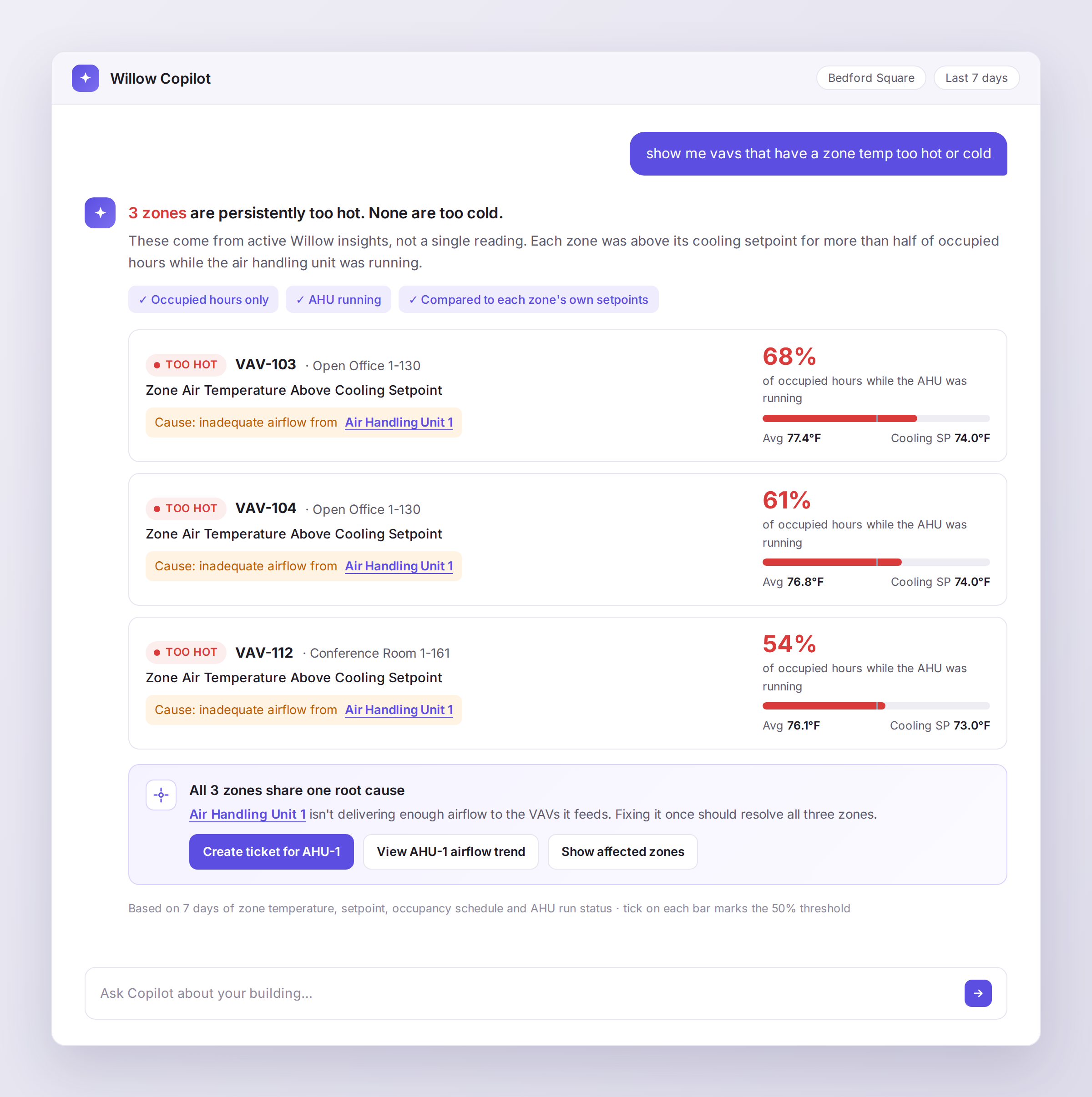
As an example, AHU Discharge Air Static Pressure Below Setpoint Causing VAV Airflow Issues indicates that Air Handling Unit AC-10-1 is not maintaining sufficient discharge-air static pressure. As a result, multiple downstream VAV units receive inadequate airflow and cannot properly cool their zones, causing elevated temperatures and potential occupant discomfort. As shown below, a prompt in Willow Copilot returns a response that takes all related Insights into account.
To Sum it Up
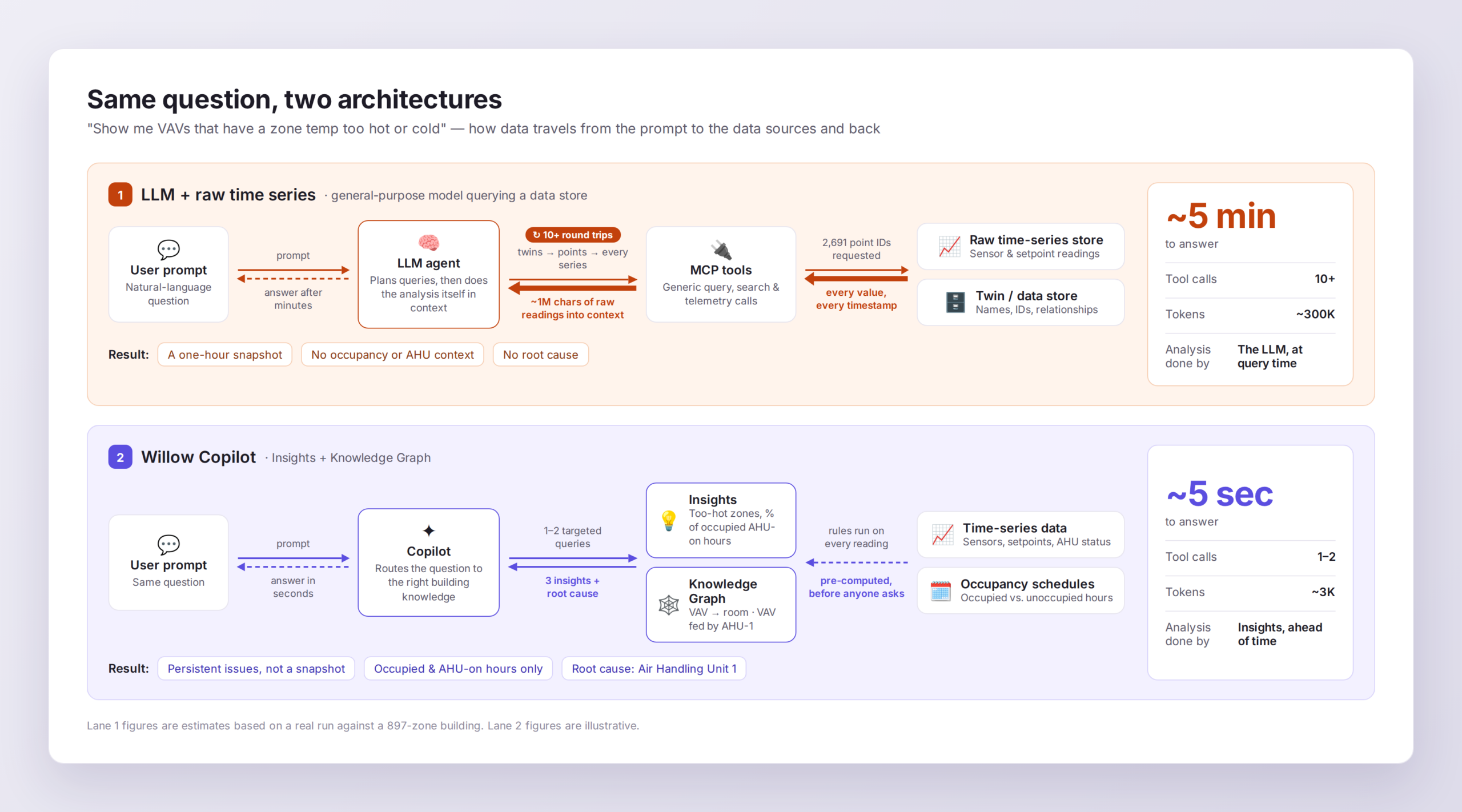
When you have complex equipment participating in complex systems, all interacting in spaces that have a wide variety of usage, that is a lot of context required just to properly answer something as simple as a question related to comfort. While it may be possible to pass in all of that context to the AI assistant that is reaching into those individual data sources, a typical user doesn’t have that time, ability, or AI token budget to handle that. This is a key item to understand when comparing a Copilot experience where the user expects answers in seconds with an AI assistant where a user may find it acceptable to respond back minutes later. This is where at Willow we’ve seen that the combination of Activate Technology producing Insights that understand this context combined with the power of the LLM and the same data sources, produces results that are more actionable and more accurate.